Honey, I shrunk the TV
 Graphic design is my passion
Preface
Some time ago, when I was deciding what sound system I wanted for my restroom, I stumbled across Samsung's (At that time, flagship) Q990D soundbar.
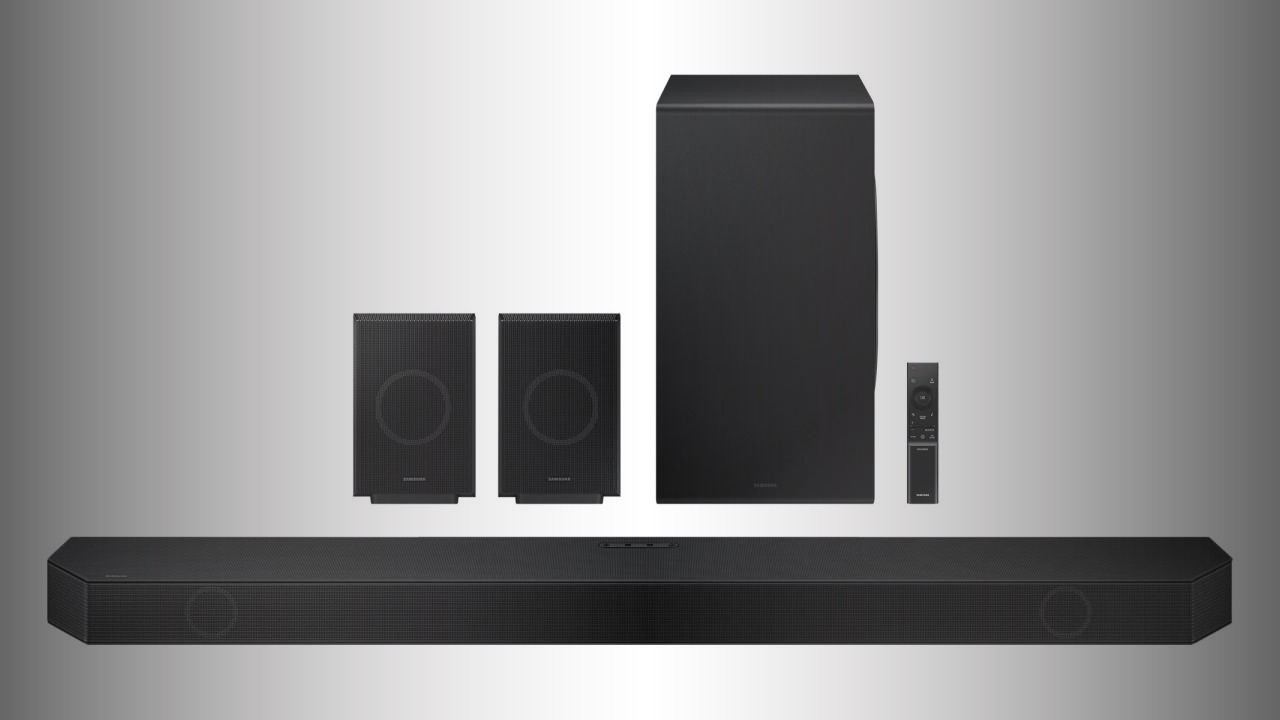 The Q990D
I've always wanted an AVR since it basically enables me to improve the sound stage in a way that is more tailored to how I like things to sound; but oh my, they ain't cheap...
My setup
So I went with the soundbar (r/hometheater please put down your pitchforks).
It was heavily discounted since the new model had already been announced so it made sense for me.
For the price, it does a good enough job for me; but one thing that kinda bothered me is that the sound coming out of the actual soundbar (The front part of the mix, basically) sounded too "crowded"/compressed.
Like, it wasn't wide enough for my liking, center channel and the 2 fronts seemed like a single one; which makes sense since this is a soundbar after all, lol.
I also want to say that by no means I'm an audio connoisseur so some of the terms I may use to describe the sound stage may be completely wrong, but hopefully you get the idea.
Using Samsung's "SmartThings" app (Or the soundbar's remote) you can basically configure the soundbar to your liking, from the usual EQ stuff and sound modes, to speaker levels and all that. One particular setting that piqued my interest was the ability to configure the Q990D satellite (Traditionally, rear) speakers as front drivers instead of surrounds.
 Also stated as a valid config on the manual
I was actually interested on seeing if this would improve the sound, so I made some quick tests and indeed; the front sound stage improved. Issue is, I now didn't have rears...
Whilst you can set a custom sound mode that "virtualizes" surround speakers (To my knowledge, it basically tries to use the satellite and the bar's side-firing speakers to bounce off your walls a surround-ish sounding sound; which... well...) I kinda wanted to have the best of the 2 worlds; but at the time I investigated how I could do so, the best way to go with it was to use the Samsung Music Frames...

...but I think it looked to hideous...
So on I went with my life.
New product lineup
Sometime in 2026, Samsung announced 2 new wired/wireless speaker lineups; the Music Studio(s).
 Music Studio 5 and 7, respectively
The Music Studio 7 immediately caught my attention, whilst it was priced steeply (Again, for what you pay for the Q990D, the Studios and the Samsung TV you can probably get a much better AVR setup) it sounded (Pun intended) like it was probably what I was looking for.
After some online searching, I found out that I could leverage Samsung's Q-Symphony to drive both the soundbar (And it's satellites) and the 2 Music Studio 7s on my setup.
Q-Symphony, at the best of my knowledge, is an "orchestration" system that Samsung has (Similar to LG's WOWCast/WOW Orchestra) to enable simultaneous driving on (Usually) the TV's built-in speaker and your soundbar.
The general opinion is that it doesn't make much sense to use it if you have a mid-to-high end soundbar (Since the TV speakers are usually "inferior" to those on the soundbar) and can create sound signature issues and whatnot. But it turns out it can also enable the use of other (Samsung-branded, of course) speakers.
So I thought, hey, maybe this is worth a shot.
Lo-and-behold, a week later they arrived.
Configuration issues
I quickly unboxed the speakers, found a placeholder location to install them (I wanted to test them before commiting to a full install) and tried to configure them. To my surprise, I couldn't get the TV to recognize them in any way.
After lots of digging and testing, I stumbled across an interesting message on the SmartThings app (Within the Music Studio 7 configuration menu).
If your Wi-Fi router has DFS enabled (I'm no expert, but it basically lets the router choose what channel to use for wireless communications) the Music Studio 7s outright refuse to connect to the TV (Or well, anything really; at least over Wi-Fi).
The application vaguely let you know this (Not during setup, not during configuration, not during anything important when it comes to initializing and properly using them; funny) when you try to change what endpoint you want to connect to, this is like, 3-4 submenus deep in the config.
So, I chose one of the supported channels on my router and they then, connected to the TV just fine.
It kinda suprised me because it's the first device I ever encounter that has this "limitation". I figure that since Q-Symphony can be used over Wi-Fi, they want the thing to run as stable as possible (Even if that means a fixed channel, the use of the 5GHz band...), but I've never seen other devices try to go this far to even just work.
After this, I proceeded to configure Q-Symphony. Second surprise of the day, if I wanted to drive both the soundbar and the Studios; I'd have to do so through' Wi-Fi entirely. It didn't matter if the soundbar was connected through' HDMI eARC to the TV (And the fact that I tried a few times Q-Symphony with the TV speakers to see how it worked and it let me do so using wired HDMI eARC just fine...).
Weird thing, after some research online it seems that at some point someone somewhere on Samsung did indeed tell consumers that it was a feature Q-Symphony has (Like, the ability to use the soundbar in wired mode and the rest in wireless).
Q-Symphony also seems to be mostly reserved for wireless use for some reason, I understand it from a marketing perspective (If you are trying to ) and ease of use, but it'd be cool to have the ability to also have the setup working in "wired" mode. This would make it argueably easier to set up, if you take out cableing from the equation that is. Side-effect is that you don't get the possible latency/disconnects/issues that wireless brings to the table.
Anyway, I'm still deciding whether to put them on the front or the back; since Q-Symphony is pretty opaque and Samsung doesn't really tell much about it, I'm not entirely sure how many shortcuts it takes when it comes to doing the audio distribution.
My main concern is:
- If I put the Music Studio 7s as surrounds and the Q990Ds satellites as fronts (Through the SmartThings app), will it do the channel separation correctly?
The concern basically exists due to the fact that when I used the satellites as fronts w/o any surround mode or surround virtualization, you couldn't reallly hear the surround sound at all; which is to be expected.
But since the inner workings of the system are undocumented I'm not particularly sure that they are doing proper channel driving based on what the setup looks like or if it just takes the least/most-common-denominator of the setup (Like, soundbar with whatever satellite config, be it with or without surround) and then mixes the rest of the speakers accordingly, effectively making the Studio 7s not play "true" surround channel audio and instead something Q-Symphony's algorithm spews or if it's intelligent enough to send the mix correctly depending on what the spatial configuration is.
But I fear I don't have an answer to that, at least yet.
Regardless, after all this setup and whatnot; the Studio 7s are now happily living as front speakers (And the soundbar acts like the central channel, of sorts).
The actual Q-Symphony "limitation"
After some days of use, I started noticing some amount of "echo" when watching the TV. It was mostly noticeable whenever a specific sound was "moving" from the fronts to surround (For example, I was playing GTA 5 and when panning the view, certain NPC dialogues that moved from the fronts to the surrounds) or with certain types of dialogues (That are close to the microphone when being recorded, for instance).
I was pretty confused and I thought it had to do with wireless latency issues with the Music Studio 7s. While it is related to latency (I think), the issue wasn't the Studio 7s per se, but the TV speakers.
Some testing endured and I found out that, indeed, the Music Studio 7s and the soundbar were slightly later to the party when it comes to playing sounds vs the TV. My guess is that Q-Symphony doesn't insert a dynamic/"measured" delay when playing on the built-in speakers to ensure it doesn't play before the rest of the sound system does (Again, due to Wi-Fi and all that) so you get this issue.
I thought well, no big deal; I just disable the TV speakers and call it a day. After all, the slight delay goes unnoticed for me (I can't really tell if there's noticeable lipsync delay and similar) so it's not like I'd be disabling something super important...
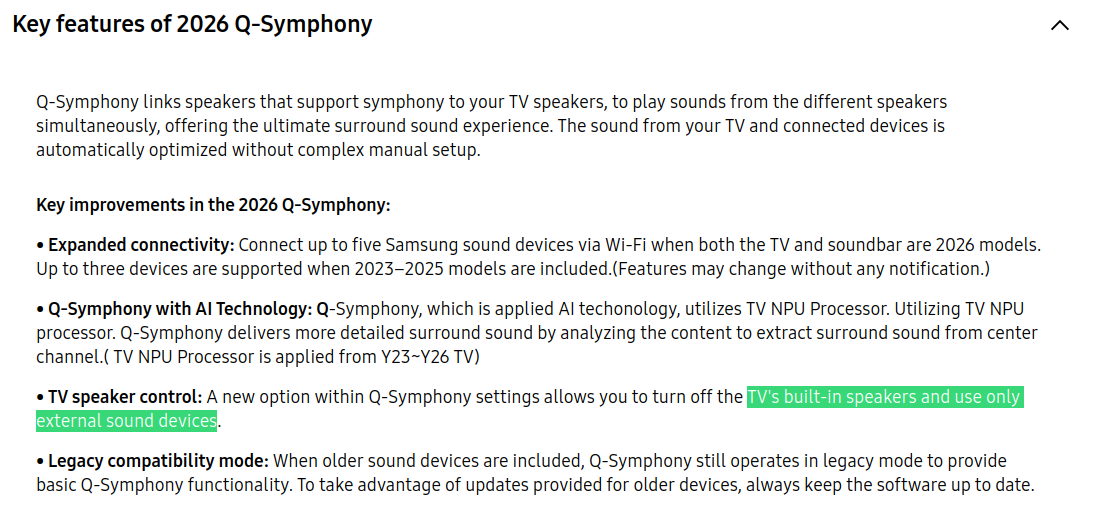
Apparently disabling the TV Speakers from Q-Symphony is limited to 2026+ hardware.
what.
So here I was, thinking how something like not driving a set of speakers was tied behind a paywall. And it's not like my 2025 TV doesn't have the processing power to not do so.
lol.
I started thinking, well, maybe I could disassemble the TV and see if I could disconnect those, but it was probably way too much work (And the risks it comes with); but what if somehow unplugging them makes it so that Q-Symphony gets disabled somehow? I couldn't risk it...
Enter the service menu
Nowadays, there's usually a TV remote button configuration that lets you access the "secret" menu of your TV (For mainstream brands at least). It may contains stuff like panel calibration, power-related stuff, maintenance mode things... It all really depends on the model and maker. But most importantly; it may contain audio-related settings that are otherwise not available on the regular menus.
So I did what a sane person would do, which is, investigate the menu:
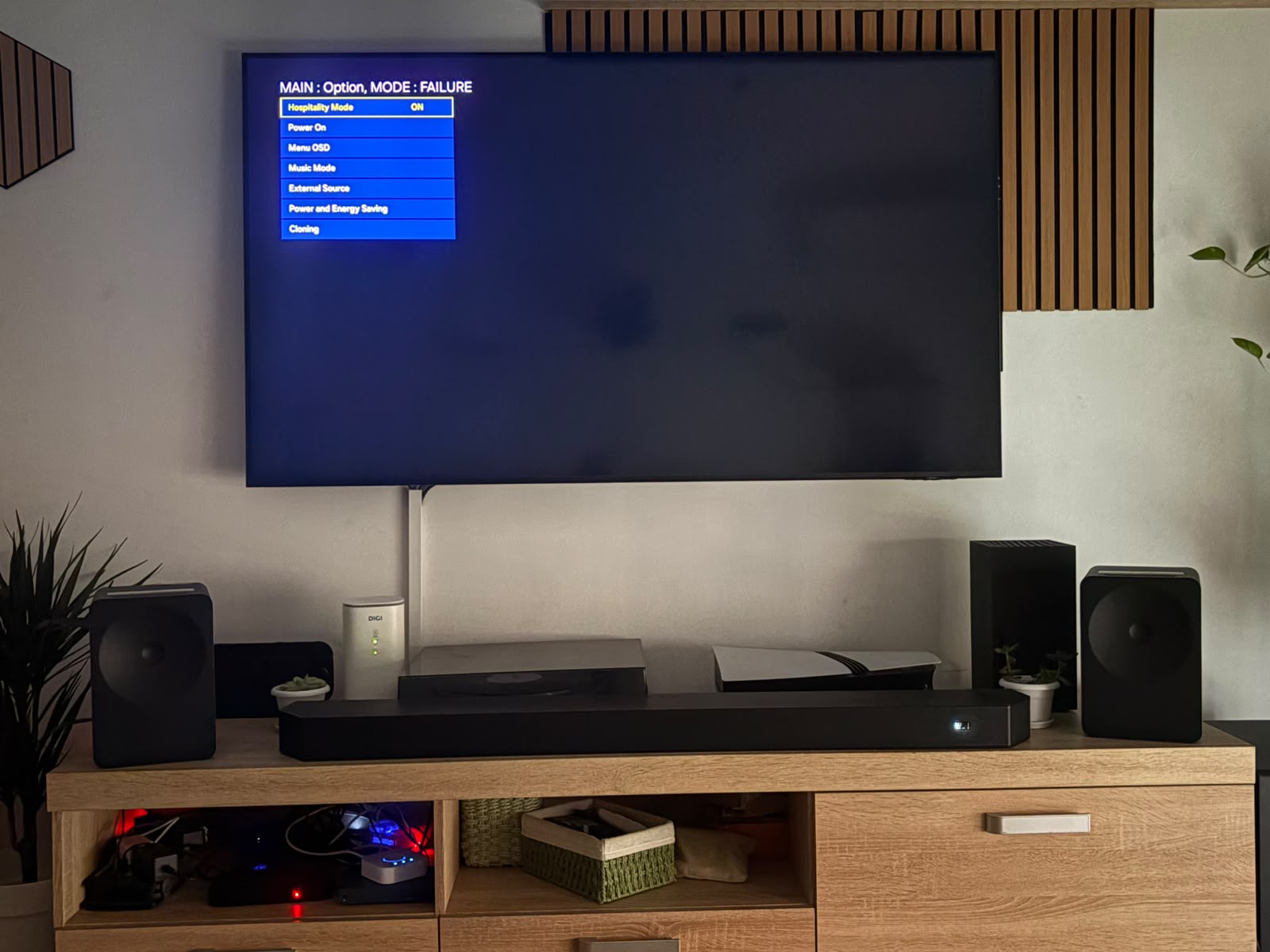 Mute + Up + Down + Center + Mute is the Konami-code combination for my particular model
I fiddled with the submenus until I stumbled across the "Power" submenu:
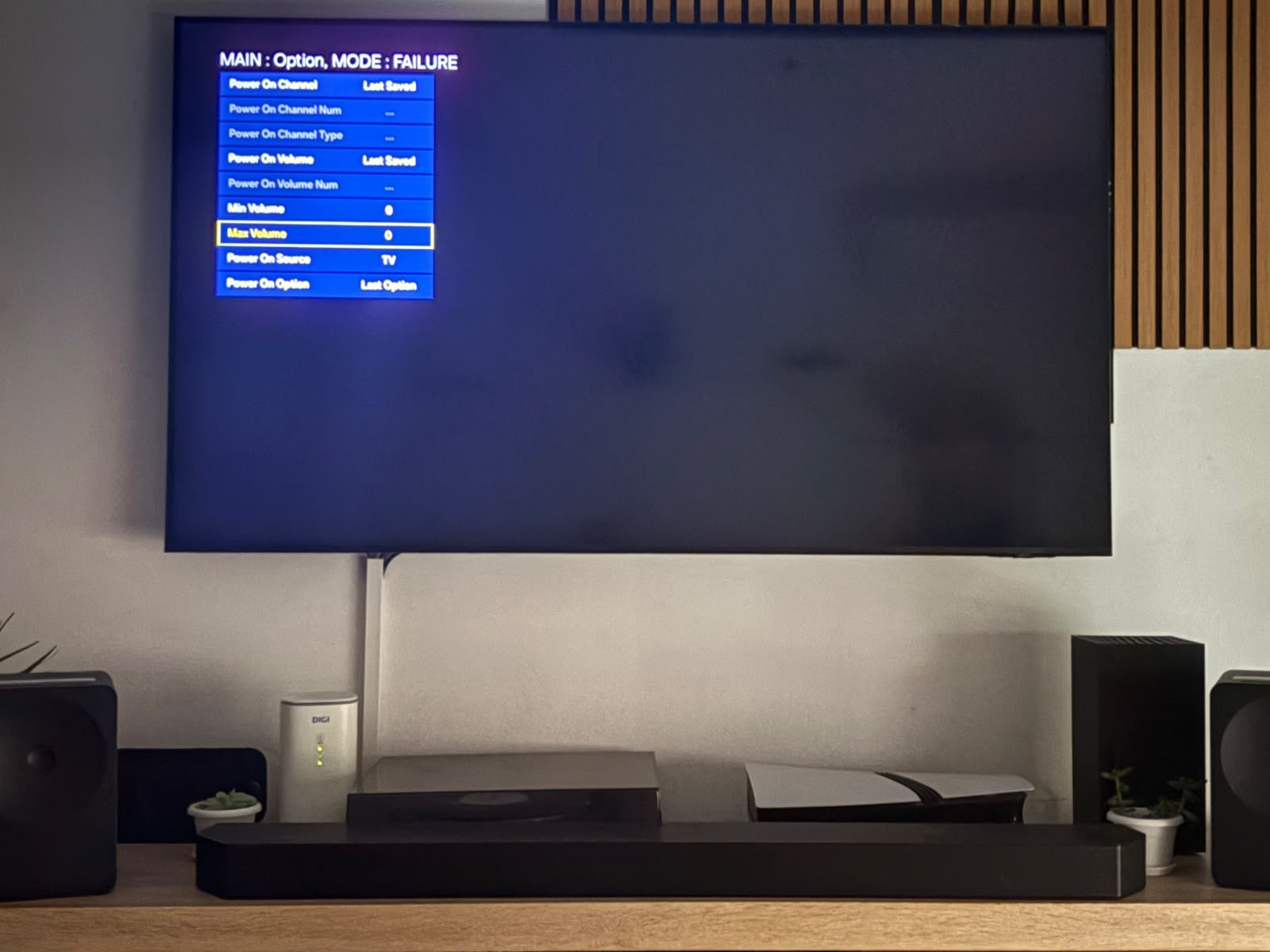 Min/Max volume options!
There it was, I saw 2 interesting options; "Min Volume" and "Max Volume" whose values are 0 and 100 respectively by default. I thought that maybe, setting "Max Volume" to 0 would mute the TV speakers; but at the same time someone might've been smart enough to also cap the maximum output for the rest of the audio system...
I'm happy to report that, indeed, it mutes the built-in speakers but the rest all work just fine! My guess is that since Q-Symphony works over Wi-Fi they just didn't do whatever check they run but on the wireless source too:
extern int audio_cap_max_service_mode;

void process_audio(...) {
    int audio_level = get_tv_audio_lvl(...);

    // Super duper simplification lol, the bug is surely something else (I hope)
    if (audio_src == TV || audio_src == HDMI || audio_src == OPTICAL || audio_src == eARC) {
        audio_level = min(audio_level, audio_cap_max_service_mode);
    }

    // Q-Symphony unaffected... heh
    ...
}
It sure feels like some check wasn't done somewhere, but hey, I'll take it :)
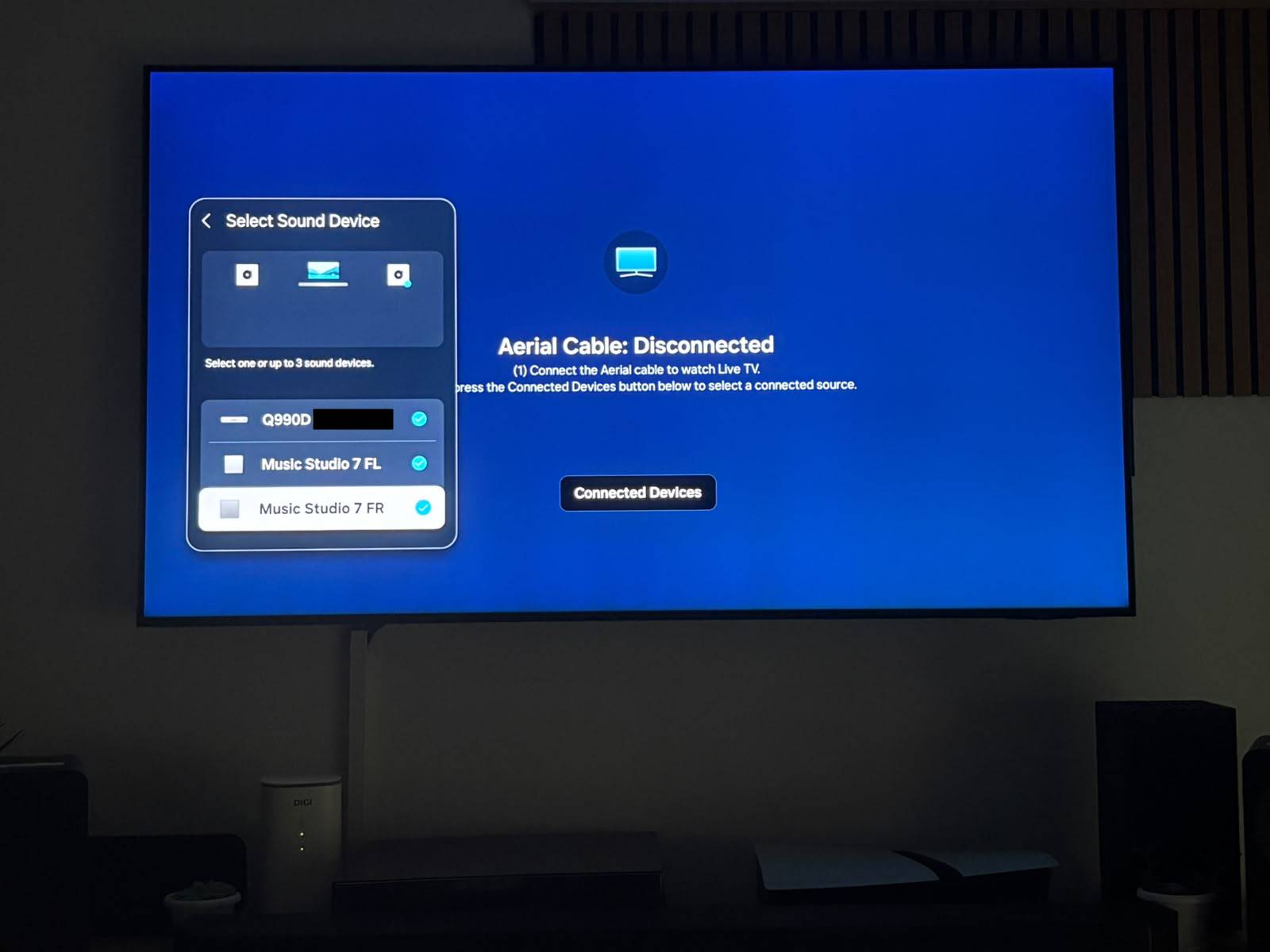 Woohoo
It still quirks me a bit that I don't get to know how Q-Symphony truly does it's mixing and output but at least I don't have the jarring echo.
This makes me question why would Samsung paywall something like this. It's not that they can't do it right now for older TVs. Why would they choose greed this out (Moreso when it can end up in a bad sound experience on a system they designed and advertised!). What hardware feature do you need to mute the output on newer TVs that mine doesn't have?
But it's 2026, and corporate greed is rampant; so whatever.